
| ARC Support
ProTected learning Hour
| Previous Page | Back to list of all ePAD Guides | Next Page |
Adding a protected learning hour record
Full details on the protected learning hour can be found here. There are additional guidelines located within the ePAD.
Please note – It is not permitted for students to start their placement late or finish early to complete the Protected Learning Hour at home.
Accessing the Protected Learning Hour page
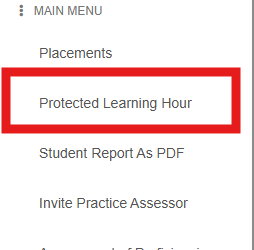
Access the Protected Learning Hour page through the main menu
Adding a new entry
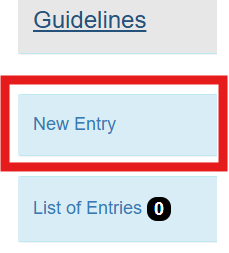
To add a new Protected Learning Hour record, click the New Entry button
You will now see the New Entry screen
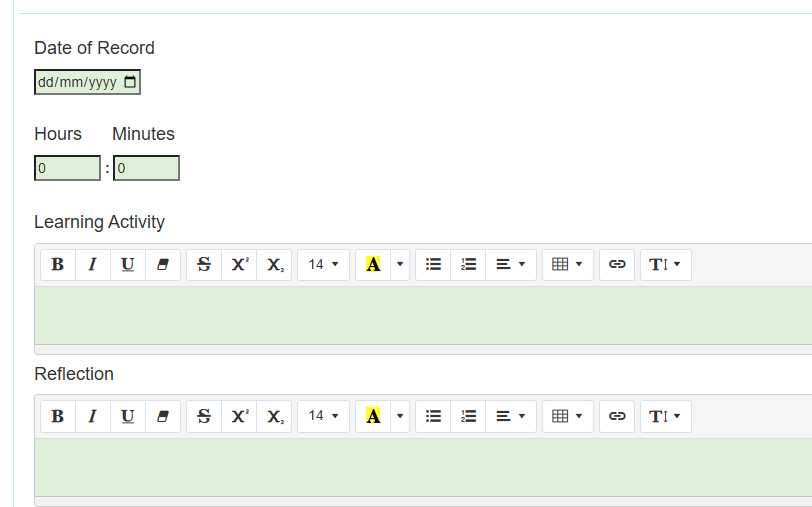
You need to enter the date you undertook the protected learning hour, the actual time taken, a description of the learning activity, and a brief reflection on what you learned. You can split the hour into smaller sections, e.g. half an hour one day and another half an hour later in the week, but you must not take more than one hour each week.
When you have completed the form, click the Save and Submit button
You can now submit the Protected Learning Hour record to your Practicve Supervisor or Practice Assessor.